How to Look After an Online Memorial Together

An online memorial usually starts with one person. Someone sits down one evening, adds a name and dates, writes a few paragraphs and uploads the photographs they have to hand. Then the rest of the family starts to remember things.
A sister has the wedding pictures. A cousin knows the name of the street where everyone grew up. An aunt corrects a date. Before long, the person who made the page is passing messages back and forth and copying other people's words into the story.
Pure Memorial lets you share that work. You can invite relatives to become keepers of the page: they can add photos, write and correct the life story and approve memories, while you keep the decisions that should stay with one person. And if the time comes for someone else to look after the page, you can pass it on.
When it helps to share the page
Sharing the care of a memorial is useful whenever one person cannot, or should not, do it alone:
- Siblings in different countries. Each holds part of the photographs and stories. Rather than collecting everything by e-mail, each can add what they have directly.
- A parent who started the page, and a child who is better with photos. The parent writes; the child scans old prints, adds captions and fixes the layout.
- The family historian. One relative knows dates, places and names. Making them a keeper means the page stays accurate without anyone retyping their notes.
- When the person who made the page is unwell or busy. Someone else can keep approving memories and answering relatives, so the page does not go quiet.
- Handing it to the next generation. A page made by a widow for her husband may one day be looked after by their children. Passing ownership keeps the page, its photos and its memories in one place.
What a keeper can do, and what stays with the owner
Every memorial has one owner: the person who made it, or who received it later. The owner can add up to five editors.
Editors can:
- edit the name, dates, epitaph, life story and life chapters;
- add, caption, order and delete photographs, and change the cover;
- edit the resting place and the note for visitors;
- approve or delete memories left by family and friends;
- invite people to leave a memory.
Some things stay with the owner: who can see the page (Public, Unlisted or Private), the settings for memories, hiding the resting place, verification with a death certificate, and deleting the page. The page also stays on the owner's plan, so its photo limits are the owner's, not the editor's.
Step 1: invite a keeper
Open your memorial, choose Edit memorial and scroll down to Family keepers. Enter the relative's e-mail address and press Send invitation.
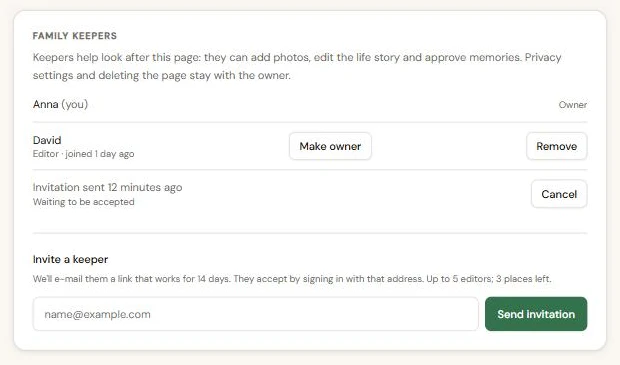
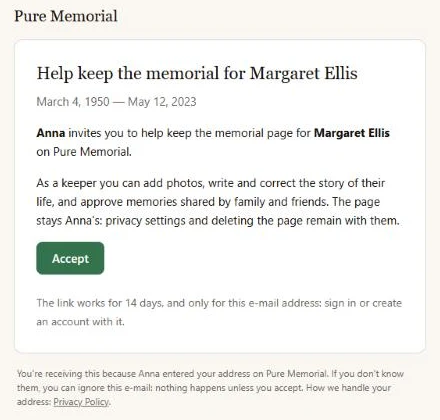
They receive an e-mail with an Accept button. The invitation link works for 14 days, and only for the address you entered. If they forward the e-mail to someone else, it will not give that person access.
While an invitation is waiting, you can see it in the list and cancel it. If the e-mail went astray, invite the same address again: the new link replaces the old one.
Step 2: accept the invitation
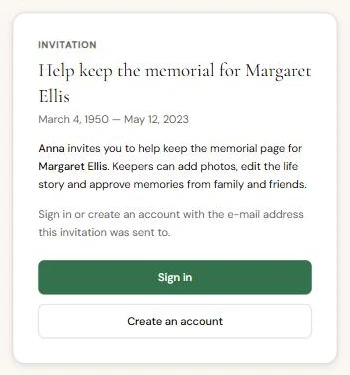
The link opens a short page explaining the invitation. Your relative signs in, or creates an account, with the address the invitation was sent to. Opening the link does nothing on its own; they become a keeper only when they press Accept.
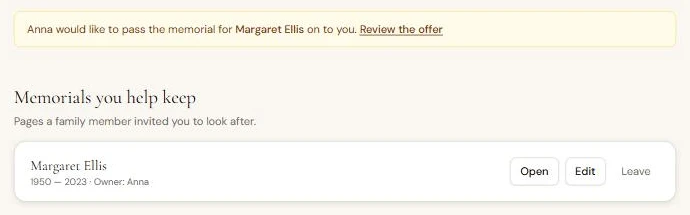
From then on the memorial appears on their dashboard under Memorials you help keep, with buttons to open it, edit it, or leave if they no longer want to help.
Editing together without losing anyone's changes
Keepers edit the page in the same place as the owner, through Edit memorial. Two practical safeguards make working together easier.
Nobody overwrites someone else by accident. If two keepers have the edit page open and both save, the second person sees a message that someone else changed the page while they were editing. Nothing is overwritten. What they typed stays in the form, so they can copy it, reload the page and add their part to the new version.
The owner can see who changed what. At the bottom of the edit page, Recent changes lists who added a photo, approved a memory or changed the life story, and when.
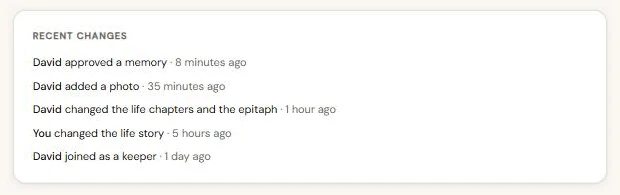
The list shows that something changed, not the old text. It is there so the family can talk about edits openly, for example "I shortened the chapter about the farm, is that all right?", rather than to police each other.
Step 3: pass the page on
Sometimes the right person to look after a memorial changes. You may be moving abroad, finding it hard to keep up, or simply feel that a son or daughter should hold it now.
To pass the page on, the new owner must already be one of its editors. In Family keepers, press Make owner next to their name. Choose whether you want to stay on as an editor afterwards, type the name on the memorial to confirm, and press Send the offer.
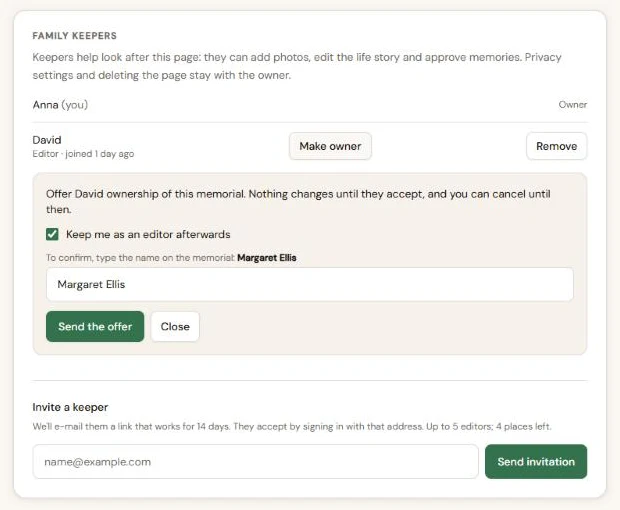
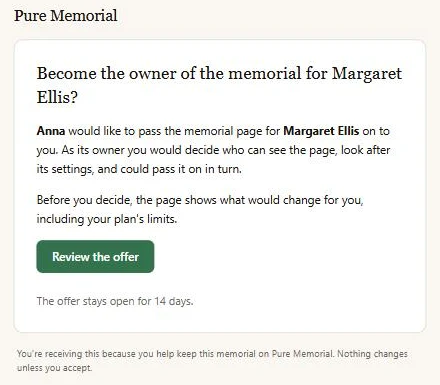
Nothing changes yet. Your relative receives an e-mail and sees a notice on their dashboard.
Before deciding, they see exactly what would change for them: the page moves to their plan, and on the Free plan some photos may be hidden from visitors until they upgrade. Hidden photos are kept, not deleted. They tick a box to confirm they understand, then accept or decline.
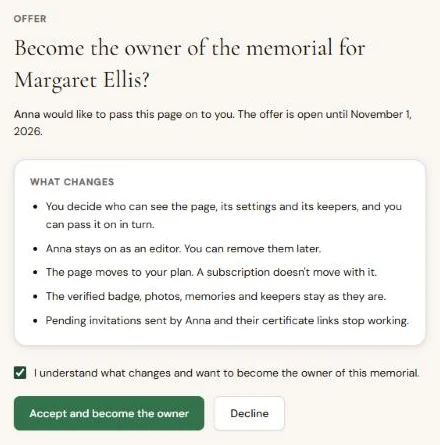
If they accept, they become the owner straight away and you become an editor, if you chose that. If they decline, nothing changes and you are told by e-mail. Until they answer, you can cancel the offer, and it expires after 14 days.
A few habits that help
- Agree who does what. One person collecting photos and another writing the story avoids duplicated work.
- Never share a password. Inviting a keeper gives them their own access, which you can remove at any time. A shared password cannot be taken back.
- Keep the owner reachable. Visitors and relatives may need someone to decide about privacy or memories. If the owner steps back, pass the page on rather than leaving it.
- Remove access when someone no longer helps. Remove in Family keepers takes away their access without touching what they added.
- Talk about big changes first. A life story belongs to the whole family. A quick message before rewriting a chapter saves hurt feelings later.
A memorial page is rarely the work of one person, even when one person starts it. If you have not made one yet, you can begin with a name and dates and invite the rest of the family when you are ready.